


If you searched for a TikTok Ads coupon code, you probably found a list of codes that don’t work. That’s because TikTok doesn’t give out public codes you can paste into your ads account.
What TikTok offers instead is ad credit. New advertisers can unlock up to $6,000 in bonus ad credits by signing up through an official partner page and reaching set spend targets within their first 30 days. The more you spend, the more credit you get back to reinvest in your ads.
In this guide, I’ll explain how the offer works, the two coupon types TikTok uses, and how to claim yours step by step. You’ll also learn who qualifies and the mistakes that cost people their credits.
Affiliate disclosure: This post contains affiliate links. If you sign up through them, we may earn a commission at no extra cost to you.
TLDR:
- There’s no working TikTok Ads coupon code in 2026. But new advertisers can get something better, up to $6,000 in free ad credits.
- TikTok matches your ad spend. Spend $6,000 and TikTok adds another $6,000, so you run $12,000 worth of ads for half the price.
- That means you save 40% to 50% on your ad budget at every tier.
- The offer only works if you sign up through an official offer page. If you create your account directly on TikTok, you lose the offer for good and can’t add it later.
- You have 30 days from sign-up to hit your spend target.
- Stopping just short of a tier can cost you hundreds in credits. Use our calculator below to plan your budget before you sign up.
TikTok Ads Coupon Code 2026
There is no active coupon code for TikTok Ads in 2026. Instead, you can get up to $6,000 in free ad credits to use on your TikTok ad spend.
TikTok is offering these credits by partnering with Resourcera. With our partner offer, you get extra budget to run more ads and outspend your competition.
Here is how it works.
When you sign up as a new advertiser through our link, the offer is added to your account. Then TikTok matches your ad spend with free credits. For example, if you spend $200 on TikTok ads, TikTok gives you another $200 in credits.
The match works across five tiers and goes up to $6,000. So if you spend $6,000 of your own money on TikTok ads, TikTok gives you another $6,000 to spend.
Here is the full breakdown.
| You Spend | Credit You Get | Total Ad Budget | Effective Discount |
|---|---|---|---|
| $200 | $200 | $400 | 50% |
| $300 | $200 | $500 | 40% |
| $1,000 | $1,000 | $2,000 | 50% |
| $5,000 | $4,000 | $9,000 | 44.4% |
| $6,000 | $6,000 | $12,000 | 50% |
Note: You only get the credit for the highest tier you reach. For example, if you spend $5,000, you qualify for the $4,000 tier, not a $5,000 match. So it’s worth planning your budget to land right on a tier.
The exact offer shown in your account can vary by region, so always check the numbers on your Promotions page after you sign up.
TikTok Ads Credits Eligibility
The offer is for new advertisers who have never run ads on TikTok Ads Manager. You also need to sign up through an official offer page and be based in one of the 66 supported countries.
Here are the main eligibility rules.
- Only new advertisers can avail this offer. If you or your business have run TikTok ads before, you won’t qualify.
- You must sign up through an official offer page, like our partner link, for the offer to be added to your account.
- Once you sign up, you get only a 30-day window to use the credits. You need to reach your spend target within 30 days of registering.
- You can’t stack tiers. You get the credit for the highest tier you reach.
- Your account country must be the country where your business actually runs.
- One offer per Business Center. If one ad account under your Business Center already got the offer, another account under it won’t.
- Credits can’t be cashed out or moved to another account.
The offer runs in most regions where TikTok Ads Manager is available. You can find the full country list further below.
(Read more at: TikTok New Advertiser Incentive Program)
How to Claim Your TikTok Ads Credits (Step by Step)
To claim the credits, sign up for TikTok Ads Manager through our partner link and start running ads within 30 days. Follow the steps below in order so the offer is added to your account correctly.
Step 1: Open the Offer Page
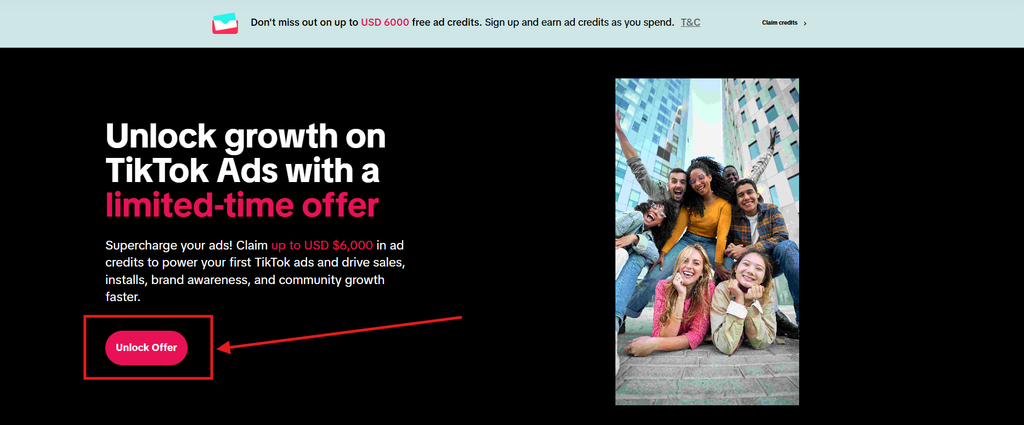
Click our partner link button below. It takes you to the official TikTok offer page. Then click the Unlock Offer button on the screen.
Step 2: Fill In Your Business Details
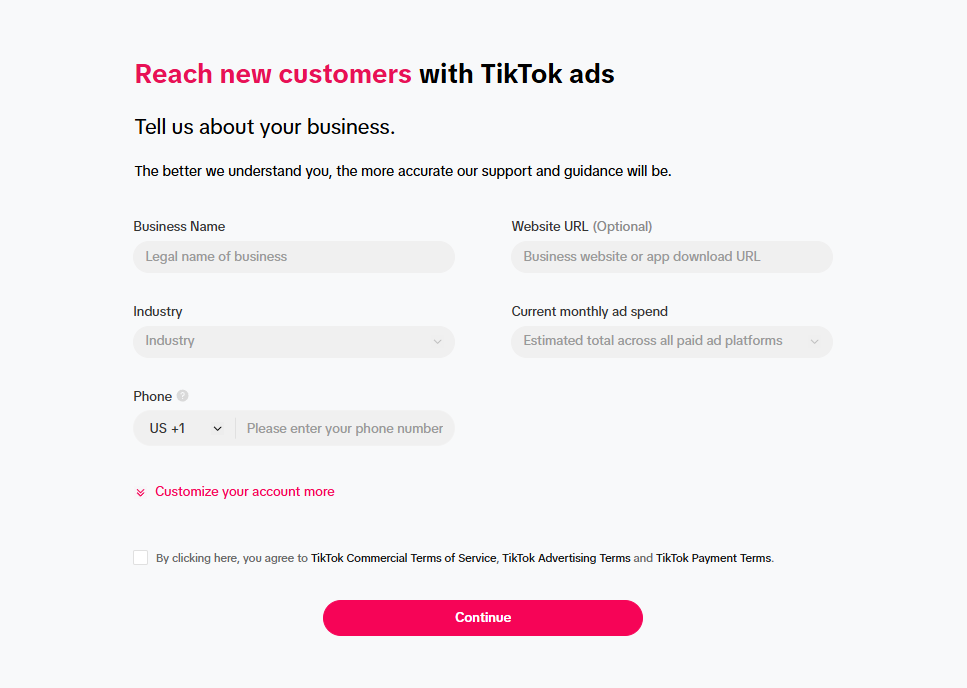
Next, fill in the form with your business information. Choose the country where your business is actually based, because TikTok requires you to register in your local region.
Step 3: Check That the Offer Is Added
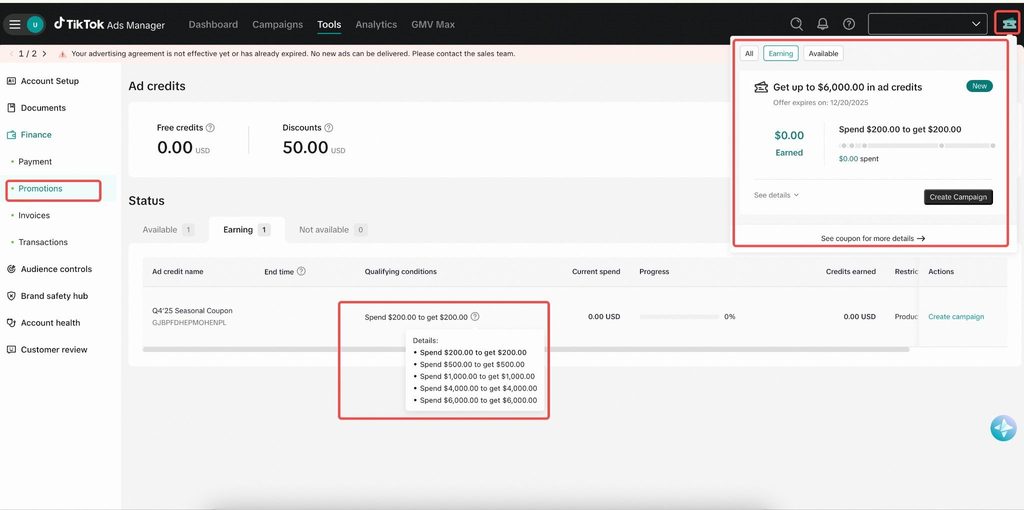
Once your account is created, TikTok adds the offer to it. To check, click the ticket icon in the top-right corner of Ads Manager, or go to Tools > Payments > Promotions.
Step 4: Add Your Payment Method
Add your credit or debit card details. You need a payment method to run ads, and only your own spend counts toward the credit tiers.
Step 5: Launch Your First Campaign
Your 30-day clock started the moment you signed up. So create your first ad campaign as soon as possible and start spending toward your target tier.
Note: Fill in all your account details correctly. If anything is missing or wrong, TikTok may hold your account for review, and that time still counts against your 30 days.
When Do You Receive the Credits?
The timing depends on the tier you reach.
| Tier You Reach | When the Credit Arrives |
|---|---|
| Tiers 1 to 4 ($200 to $4,000) | 1 to 3 business days after your 30-day window closes |
| Tier 5 ($6,000) | 1 to 3 business days after you cross $6,000, without waiting for the window to close |
You can track your progress anytime under Tools > Payments > Promotions.
(More info at: TikTok New Advertiser Incentive Program, TikTok Ad Credits)
Free, Assignable, and Conditional Credits
When your credit lands, it shows up as one of three types. Free credits apply on their own, but Assignable credits do nothing until you add them to a campaign.
| Credit Type | How It Works | What You Need to Do |
|---|---|---|
| Free credit | Applies to your campaigns automatically | Nothing |
| Assignable credit | Works only on the campaign you assign it to | Assign it from the Promotions page |
| Conditional credit | Applies only when certain conditions are met, like a spend target | Meet the conditions shown on the credit |
To assign a credit, go to Tools > Payments > Promotions, open the credit, and click View/Assign. You need admin access in Ads Manager to do this.
The Promotions page has three tabs. Available shows credits you can use now, Earning shows offers you’re working toward, and Not available shows credits that have expired or been used up.
How to Register an Ad Credit Inside Ads Manager
Some ad credits show up inside your TikTok Ads Manager account instead of on a sign-up page. You can register these yourself in a few clicks.
These usually come from a TikTok sales rep or appear on eligible accounts. Here are the steps.
- Log in to TikTok Ads Manager.
- Click the ad credit icon in the top-right corner. You’ll see all the new and ongoing credits you qualify for.
- Click See details to read the credit’s terms.
- Scroll to Targeted products to see which ad types the credit works with.
- Click Register.
If the button says Create campaign instead, you’re already registered or the credit was added to your account automatically. Some accounts get credits without registering, so you may not see this list at all. In that case, check the Promotions page.
How TikTok Shop Sellers Get the Credits
If you sell on TikTok Shop, you get your new advertiser offer through Seller Center, not the regular sign-up page. Most sellers already have an ad account created for them, so you only need to connect it.
Here is how to find your offer.
- Log in to Seller Center.
- Go to Marketing, then Shop Ads.
- Connect the ad account shown, or create a new one.
- Look for the promotion banner that appears after you connect.
What happens next depends on your region. In some regions, you click a button like Join now to claim the offer. In others, you’re enrolled automatically, and the credit is issued when you publish your first GMV Max campaign.
To track your progress, go to Marketing > Shop Ads > Ads Dashboard > Coupon Progress in Seller Center.
The offer is only for shops that have never advertised on TikTok Ads Manager. If you see the promotion banner in Seller Center, you’re eligible.
Countries Where the TikTok Ads Credit Program Is Available
The new advertiser offer is available in 66 countries for advertisers without a TikTok Shop. The offer amount and terms can differ from one country to another.
| Region | Countries |
|---|---|
| North America and Caribbean | United States, Canada, Mexico, Puerto Rico, Dominican Republic, Guatemala, Costa Rica, Panama |
| South America | Brazil, Argentina, Chile, Colombia, Ecuador, Uruguay, Bolivia, Paraguay |
| Europe | United Kingdom, France, Germany, Italy, Spain, Netherlands, Poland, Sweden, Switzerland, Belgium, Austria, Portugal, Hungary, Norway, Greece, Ireland, Finland, Czech Republic, Belarus |
| Middle East and Africa | Saudi Arabia, United Arab Emirates, Kuwait, Bahrain, Lebanon, Oman, Iraq, Israel, Turkey, Egypt, Morocco, Algeria, South Africa, Kenya, Nigeria |
| Asia-Pacific | Japan, South Korea, Thailand, Indonesia, Malaysia, Philippines, Singapore, Vietnam, Cambodia, Kazakhstan, Azerbaijan, Bangladesh, Sri Lanka, Pakistan, Australia, New Zealand |
Rules to Know Before You Spend on Credits
TikTok ad credits come with a few strict rules, and missing one can cost you the offer. The most important one is that TikTok keeps charging your card once the credits run out, and it won’t warn you.
Here are the rules that matter most.
- Each advertiser can redeem the new advertiser offer one time, so a second sign-up or a second offer on the same business won’t be accepted.
- The offer is tied to the account it was given to, so it stops working if you forward it to someone else.
- You can only spend your credits on ads inside your own TikTok Ads Manager account, and you can’t sell them or move them to another account.
- Every credit has an expiry date, which you can find in the credit’s details, and any amount left after that date is lost.
- TikTok charges your card as usual after your credits are used up and won’t notify you, so pause your ads first if you don’t want extra charges.
- A credit may apply only to specific ad products, so check the Targeted products section before you set up your campaign.
- If your ads break TikTok’s ad policies, TikTok can withdraw the credits from your account.
- TikTok may pause a credit if its system flags your account, and you can submit an appeal from the Promotions page to get it reviewed.
Why You Didn’t Get Your TikTok Ads Credit (and What to Do)
The most common reason is signing up without an offer page, which means the offer was never added to your account. Other reasons include missing your spend tier, an unassigned credit, or a risk check on your account.
Find your problem in the table below.
| Problem | What It Means | What to Do |
|---|---|---|
| No offer on your Promotions page | You signed up without an offer page | The offer can’t be added later. Check the ad credit icon for other credits you qualify for. |
| You spent less than $200 | You didn’t reach the first tier | Check your window’s end date on the Earning tab and keep spending |
| You reached a tier but see no credit | The credit is still processing | Wait 1 to 3 business days after your window closes, then check again |
| The credit shows but isn’t being used | It’s an Assignable credit | Assign it to a campaign from the Promotions page |
| The credit won’t apply to your campaign | Your ad type isn’t covered | Check Targeted products and pick a supported objective |
| The credit was suspended | It was flagged by TikTok’s risk checks | Submit an appeal from the Promotions page |
| You were told you’re not eligible | Your account has past ad activity or looks like an existing advertiser | Contact TikTok Ads support to check your account |
Tips to Get the Most From Your TikTok Ad Credits
The best way to get full value is to prepare before you sign up. Your 30-day clock starts at registration, so every day spent on setup is a day lost.
Here is what I recommend.
- Make your ad videos before you sign up: Your 30-day window starts the moment you register, so having two or three short videos ready lets you launch on day one instead of losing a week to editing.
- Pick your target tier in advance: Decide which tier fits your budget and work out your daily spend to reach it within 30 days. For example, reaching the $4,000 tier means spending about $134 per day.
- Spread your budget evenly across the month: Spending a steady amount each day gives your campaigns time to find the right audience, so you get better results than you would by spending everything in the last few days.
- Set a spending limit on your account: TikTok keeps charging your card after the credits run out and doesn’t warn you, so a budget cap makes sure you never spend more than you planned.
- Use your credits before they expire: Every credit has an expiry date, so add it to your calendar and plan your campaigns to use the full amount before then.
Mistakes to Avoid
Most people lose their credits because of small setup mistakes, not because they don’t qualify. Avoid these, and you’ll keep the full offer.
- Signing up directly on TikTok instead of through an offer page: The offer is only added when you register through an official offer page, like our partner link. If you sign up any other way, your account is created without the offer, and you can’t add it later.
- Choosing the wrong country during sign-up: TikTok requires your account to be registered in the country where your business actually runs. If you pick a different country to chase a better offer, TikTok can refuse or withdraw your credits.
- Stopping your spend just below a tier: You only get the credit for the highest tier you fully reach. For example, spending $990 gets you $500 in credits, while spending just $10 more gets you $1,000, so always check how close you are before your window ends.
- Waiting too long to launch your first campaign: Your 30-day window starts when you sign up, not when your first ad goes live. Every day you spend preparing ads is a day less to reach your spend tier.
- Forgetting to assign an Assignable credit: Some credits don’t apply on their own and only work once you add them to a campaign. If you skip this step, the credit sits unused on your Promotions page until it expires.
- Opening a second account to get another offer: TikTok gives one offer per advertiser and per Business Center. Its system can also flag accounts that look like an existing advertiser, which can get your credits suspended.
- Running ads that break TikTok’s policies: If your ads get rejected for breaking TikTok’s ad rules, TikTok can take back your credits. Read the ad policies before you launch so your credits stay safe.
Final Verdict
There is no working TikTok Ads coupon code in 2026, but the new advertiser credit offer is worth more than any code. It matches your ad spend up to $6,000, so you can double your first TikTok ad budget.
To get the most from it, sign up through our partner link, launch your first campaign quickly, and plan your spend to land right on a tier.
If you’re new to TikTok ads, claim the offer before you create your account. Once your account is set up without it, you can’t add it later.
FAQs
Is the TikTok Ads offer free to claim?
Yes. Signing up costs nothing, but you need to spend your own money on ads to unlock the matching credits.
Can I get the credits if I already have a TikTok Ads account?
Usually not. The offer is for new advertisers, so accounts with past ad spend don’t qualify.
Can I combine two TikTok ad coupons?
No. You can redeem the new advertiser offer only once, and you get credit for one tier only.
Can agencies claim credits for their clients?
Each credit belongs to the ad account that received it and can’t be shared. Every client needs its own new, eligible account.
Can I withdraw unused TikTok ad credits as cash?
No. Credits can only be spent on ads in TikTok Ads Manager, and any unused credit is lost when it expires.
